FOR THE PEOPLE BEHIND THE WEBSITE

Your website has
a front door.
Give it a host.

Help visitors find the answer, understand your offer and take the next step—with an assistant shaped around your business.

For service businesses, agencies and independent builders.

YOUR WEBSITE’S HELPFUL HOST ILLUSTRATION

I’m interested. Where should I start?

A little guidance can make all the difference.

An example of the experience to build.
Not a live conversation or customer result.

FOCUSED ON YOUR WEBSITE COMMUNITY
Wix · Webflow · Squarespace · Bubble

BotStacks helps website owners build AI assistants from their own content. Bring knowledge together in BrainVault, shape the experience in AI Studio and test answers in DIRTbox. For Wix, Webflow, Squarespace and Bubble builders, the goal is a useful conversation that is easier to review and maintain.

SOUND FAMILIAR?

The answers are there.
The path isn’t always clear.

  • Your best answers are buried across pages.
  • You keep answering the same opening questions.
  • Visitors want help when you’re busy doing the work.
  • You want a chatbot you can actually keep up to date.

BUILT AROUND YOUR CUSTOMERS’ QUESTIONS

Find your kind of helpful.

Start with one real problem.
Build around the questions you hear most.

Service businesses

01

Be helpful while your hands are full.

Do you cover my area? What does the service include?

The answer is on your site. Your visitor needs help finding it.

Bring service descriptions, coverage areas and FAQs into the assistant’s knowledge. Help people find the right information and your contact page.

START WITHService pages · FAQs · Contact details
Make the next step easier to find.

Agencies & designers

02

Give the conversation as much care as the website.

Can this feel like the brand I just built?

A carefully designed website deserves an equally thoughtful chat experience.

Shape the assistant’s tone and design, then test common questions with your client’s content before launch.

START WITHBrand guidance · Portfolio · Client FAQs
Make AI part of a considered customer experience.

Coaches & consultants

03

Help prospects decide whether you’re the right fit.

Who is this program for? How do I get started?

People need context before they’re ready to reach out.

Use your program descriptions, service details and published resources to help visitors understand the offer and find your enquiry or booking page.

START WITHPrograms · Service details · Getting-started guides
Put your expertise into the first conversation.

Publishers & experts

04

Make a deep archive easier to explore.

Where can I learn more about this topic?

Your most useful work can be several clicks away.

Organize selected articles and reference material in BrainVault, then test how the assistant explains topics and points readers toward relevant resources.

START WITHArticles · Glossaries · Resource libraries
Give your knowledge another way to be discovered.

Bubble & SaaS builders

05

Help people understand what you’ve built.

What can I do here? Where should I start?

The same product and setup questions keep coming back.

Build an assistant around your product guides and FAQs. Test the questions new users ask, then refine the knowledge as your product changes.

START WITHProduct guides · Setup docs · FAQs
Make the path from curiosity to understanding clearer.

Retail & hospitality

06

Help visitors with the details that matter.

What’s your returns policy? Where can I find your hours?

Small unanswered questions can interrupt a visit.

Start with published policies, location details and product or service information. Review answers when those details change.

START WITHPolicies · Location pages · Product information
Keep everyday information within reach.
A PRACTICAL WAY TO BEGIN

Your content.
A clearer conversation.

Read the setup guides ↗
01

Bring the knowledge.

Start with the pages, FAQs and policies visitors need most. Organize the information in BrainVault.

Explore BrainVault ↗
02

Shape it. Test it.

Set the assistant’s role and voice in AI Studio. Try real customer questions in DIRTbox before launch.

Explore DIRTbox ↗
03

Deploy and keep improving.

Follow the deployment guide for your website. Review conversations and revisit sources as your business changes.

Explore deployment ↗

LOOK INSIDE THE WORKFLOW

See what you’ll
work with.

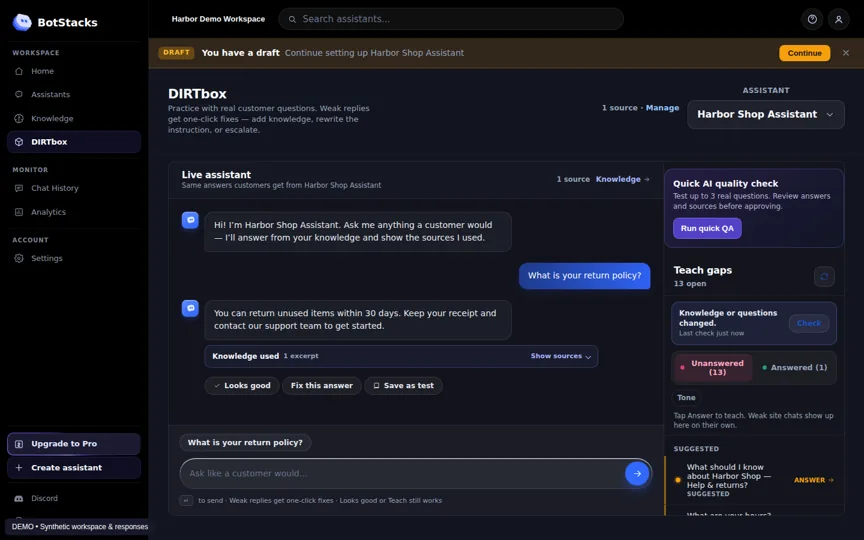
Explore a DIRTbox test conversation from the BotStacks simulator. The workspace, question and response use synthetic demo data.

Explore product screenshots ↗
BotStacks simulator showing a DIRTbox test conversation with a seeded answer and source
SIMULATOR DEMO · SYNTHETIC DATA · NOT A CUSTOMER RESULT

WHAT A BETTER WORKFLOW MAKES POSSIBLE

Useful from the first question.
Manageable after launch.

Findable knowledge

Put your business information at the center of the conversation.

A familiar voice

Shape the assistant’s tone around the experience you want visitors to have.

More informed next steps

Help visitors understand the offer and find relevant pages.

Room to practice

Try common questions and difficult edge cases before publishing.

A window into questions

Review conversations to understand where visitors need more clarity.

A maintenance routine

Update sources and retest answers when important details change.

GOOD QUESTIONS BEFORE YOU START

Let’s make
the details clear.

Ask our team ↗
What is BotStacks?

BotStacks is a platform for building website AI assistants from your business content. Use BrainVault to organize knowledge, AI Studio to shape the assistant and DIRTbox to test answers.

Which website platforms is this for?

Our focus is Wix, Webflow, Squarespace and Bubble builders. Check the deployment guide for the installation method and requirements for your specific site before publishing an assistant. Explore deployment options.

Do I need to be technical?

Start by choosing your content and testing customer questions. Website installation depends on your platform and permissions; use the deployment guide or ask our team for help with your setup.

Will it say the wrong thing?

AI can make mistakes. Use DIRTbox to test common questions and edge cases, review the source content, and correct gaps before launch. Continue reviewing conversations and answers afterward.

Does it stay current when my website changes?

Treat knowledge maintenance as part of your workflow. When important information changes, review the assistant’s sources, update them as needed and test the affected answers again.

How much does it cost?

See the current pricing page for plan details, included usage and billing terms. Choose a plan based on the assistant and usage your business needs. View pricing and plans.

YOUR VISITORS ALREADY HAVE QUESTIONS

Give them a better
place to start.

Bring your content. Shape your assistant.
Build a more helpful website experience.

Before you use AI chat

You will be chatting with an AI assistant. Answers can be inaccurate. Avoid sharing sensitive information.

Starting chat connects to our chat service, which receives connection information and processes messages you send. The widget may use browser storage for conversation continuity. See our Privacy Policy and Cookie Policy.

This control applies to this website’s chat only. Turning it off reloads the page and stops chat loading until you request it again. It does not delete messages already sent or stored conversation data. For deletion requests or human help, contact us.